把内容运营的整条流水线
装进一个工作台Your entire content pipeline
in one workbench
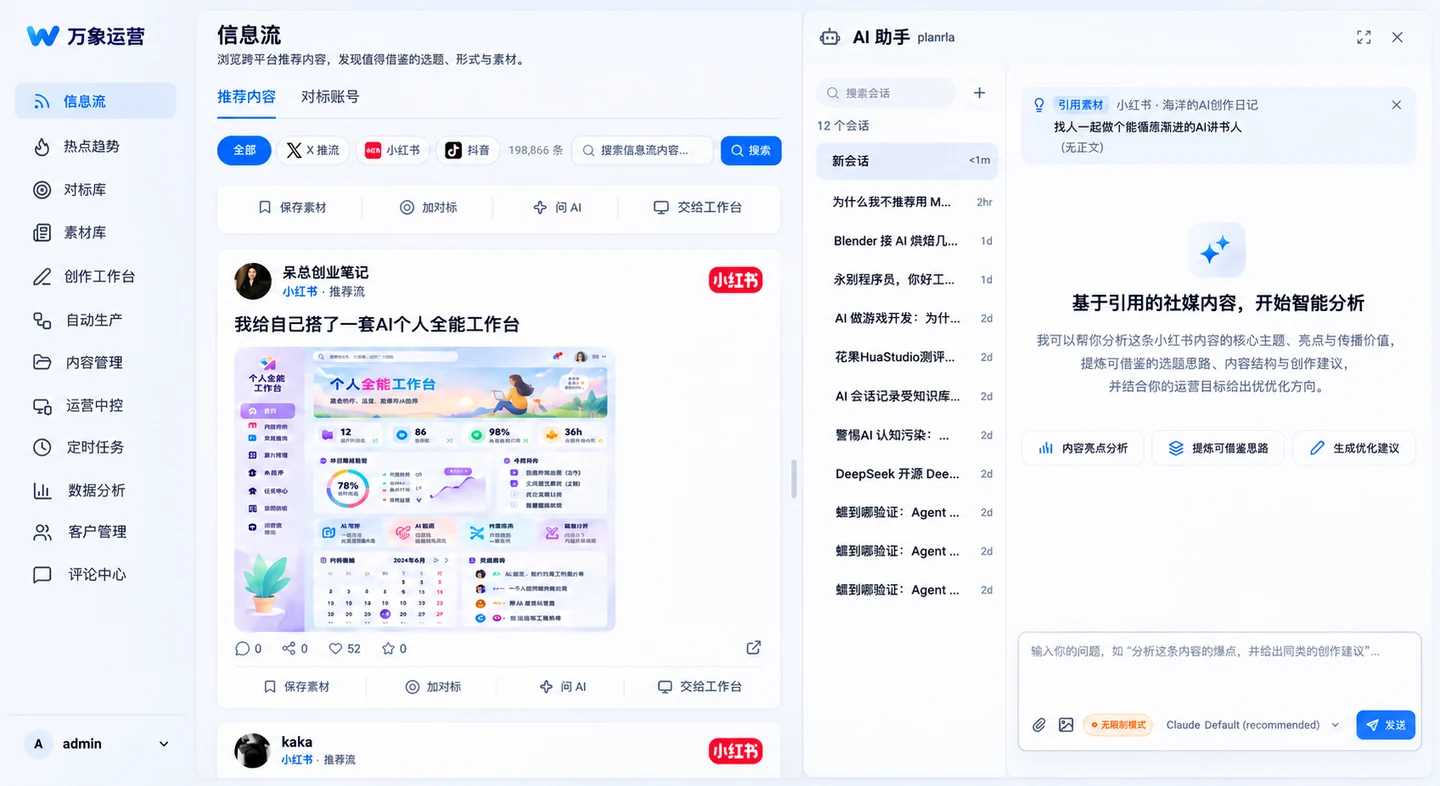
万象工作台面向公众号、小红书、X 等多平台运营场景,把账号矩阵、素材库、 内容创作、发布调度与数据回流收敛到同一个桌面工作台,并以 AI Agent 串联全流程。Weave Workbench brings multi-platform operations — WeChat, Xiaohongshu (RED), X and more — into one desktop workbench: account matrix, asset library, content creation, publish scheduling and data feedback, all orchestrated by AI agents.
⊕账号矩阵Account matrix
多平台账号统一接入与分组管理,登录态、配额与健康度一目了然,发布不再来回切换。Connect and group accounts across platforms. Session health, quotas and status at a glance — no more tab switching.
✎内容创作Content creation
选题、素材、成稿、配图到发布的创作管线内置 AI 辅助,选题库与对标库持续沉淀方法论。A pipeline from topic to draft, visuals and publishing with AI built in. Topic and benchmark libraries keep your playbook compounding.
⟳数据回流Data feedback
阅读、涨粉、评论等数据自动回流对账,爆款规律沉淀为可复用的选题与标题打法。Reads, follower growth and comments flow back automatically; what works gets distilled into reusable topic and title strategies.
浏览器插件 · 万象工作台Browser extension · Weave Workbench
刷小红书、公众号、微博、抖音、X 的同时,点赞收藏的内容一键存入万象对标库。While browsing Xiaohongshu, WeChat, Weibo, Douyin or X, save posts you like into your benchmark library in one click.
- 下载并解压插件包Download and unzip the extension
- 浏览器打开
chrome://extensions,右上角开启「开发者模式」Openchrome://extensionsand turn on Developer mode - 「加载已解压的扩展程序」,选择解压出的 wanxiang-extension 文件夹Click Load unpacked and pick the unzipped wanxiang-extension folder
⟲更新日志Changelog
- 登录态校验全面提速:与采集共用浏览器通道,不再误报「浏览器被占用」Much faster login-state checks: shares the browser channel with scraping — no more false "browser busy" errors
- 修复小红书海外版(rednote)账号登录态被误判「失效」的问题Fixed rednote (Xiaohongshu overseas) accounts being wrongly flagged as expired
- 公众号绑定设备后支持微信扫码自动重登WeChat Official Account binding now supports automatic re-login via QR scan
- 新增管理看板(管理员可见):用户消耗、趋势与明细New admin dashboard (admins only): user usage, trends and details
- AI 写稿信封格式(标题/摘要/封面)自动落位,标题重复根治,新增 AI 封面建议AI drafting envelope (title/summary/cover) auto-files; duplicate titles fixed; AI cover suggestions added
- 界面收口:AI 助手列全高停靠、页头固定、工作台连体排版等一批体验修复UI polish: full-height AI assistant dock, sticky page header, unified workbench layout and more
- 公众号发布支持小红书 WebP 图片自动转码,修复「不支持的文件类型」报错Official Account publishing now auto-converts Xiaohongshu WebP images, fixing "unsupported file type" errors
- 内容库编辑修正:点 A 篇不再打开 B 篇Content library editing fix: opening item A no longer opens item B
- 发布防重复保险:同内容同平台已有进行中任务时自动拦截Anti-duplicate publishing: blocks a second in-flight task for the same content and platform
- 组件下载加 60 秒超时,网络挂起不再卡「安装中」Component downloads time out after 60s — no more stuck "installing" on hung networks
- 窄屏界面适配、封面图裁切等一批体验修复Narrow-screen layout and cover-crop fixes